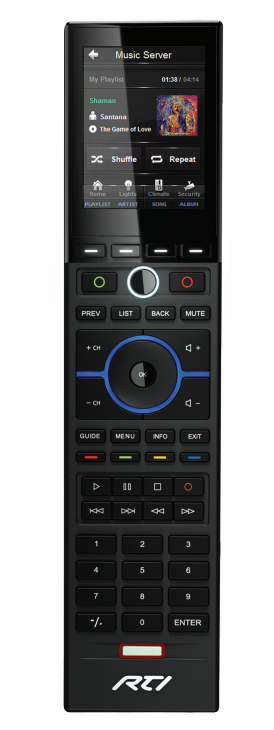
Restart RTI T2x Remote Control
Sometimes, you may need to restart your remote control to clear any error messages and/or the memory.
This is normal with any electronic device, unless it happens too frequently.
Please follow these steps to reboot/restart your RTI T2x Remote
- POWER THE T2x OFF:
Press and hold the “Backlight” button, then press the “OK” button for approximately 5 seconds until the T2x powers off.NOTE: During normal operation, powering the T2x off should not be necessary.
- POWER THE T2x ON:
Press and hold the “Backlight” button and the “OK” buttons simultaneously until the T2x powers on (Approximately 1-2 seconds).ORPlace the T2x in the docking station - this will automatically power the T2x on. (Docking station does not need to be powered).NOTE: If the unit does not power on, it may be necessary to charge the battery.
Related Articles
Restart ProControl Remote Control
If your ProControl remote became non-responsive or "acting" differently from normal operation, please follow these steps to restart the remote control. Turn the remote with the back cover facing you Slide the larger part of the from the center ...Comelit Mobile App
Free and compatible with all modern devices, the Comelit app allows you to: - Receive calls from the entrance panel wherever you are - Review video recordings taken from the cameras in your system (including the entrance panel camera) - Review video ...